Deadlines keep moving
Explanations change, while you need an independent view of whether the result matches the time and cost.
Independent software productivity assessment
DevGhost assesses each developer’s output from the changes they create in code and compares it with one benchmark: the expected output of a full-time mid-level developer who knows the project and works without AI.
See who consistently works above the benchmark, who falls below it, and where the context deserves a closer look.
No commit or line counting. No time trackers, screenshots, or surveillance.
See the result
100% is the reference developer level: a full-time mid-level developer who knows the project and works without AI.
Effort is the estimated volume of changes in benchmark-developer hours. The chart position suggests where to begin the conversation.
Compare everyone on one scale while accounting for the share of time spent coding.
See trends, sustained growth, and the periods where a decline began.
Move from the signal to the changes that need context.
When you need an independent second opinion
Status updates, Jira, and Slack show activity. DevGhost shows another layer: how much work became code and who created it.
Explanations change, while you need an independent view of whether the result matches the time and cost.
Compare the work report with what appeared in the repository. Assess employees and vendors by the same rules.
Compare periods before and after AI adoption, while accounting for tasks, roles, and team changes.
Look at contribution in code separately from chat activity, confident updates, and personal visibility.
From signal to decision
You know the goals, task complexity, and team constraints. DevGhost adds an assessment of Git changes and helps you decide what to check first.
The metric sees work embodied in code. Account separately for someone’s role, mentoring, reviews, and other work.
Review the period and trend. Recognition, growth, unblocking, or a context check: recommendations suggest a direction for the conversation.
Compare the result with tasks, role, and Share: the portion of time spent coding. Open the changes that need explanation.
Recognize contribution, clarify workload, or remove blockers. Use the facts to discuss causes and actions.
How the assessment works
DevGhost analyzes Git history and estimates the work embodied in each change. Formatting and generated files should not look like major engineering contributions.
Use the accumulated picture. Share accounts for a lead or architect who codes for only part of their working time.
No. DevGhost does not track time, screens, or keyboards. It analyzes code changes. The estimate in hours describes work volume on one scale, not time spent at a computer.
The benchmark stays fixed: a mid-level developer who knows the project and works without AI. Compare output before and after adoption while accounting for task and team changes.
A single commit can have substantial error. Use aggregated results, sustained differences, and trends, then check each signal against Share, role, and team context.
Use DevGhost as one signal, never the sole or primary basis. Consider role, task complexity, result quality, and the manager’s context.
It depends on the format. SaaS processes changes in the DevGhost cloud. Local runs entirely on your computer without external calls. On-Prem runs in company infrastructure.
Software development in the AI era
The public TryGhost/Ghost history shows engineers using Codex and Claude for implementation, tests, and follow-up work. The assessed output of one engineer has already exceeded the DevGhost benchmark by more than ten times.
of the DevGhost benchmarkSteve Larson · October 1–7, 20268.1× for the full third quarter
Right-hand labels: trend change, pp
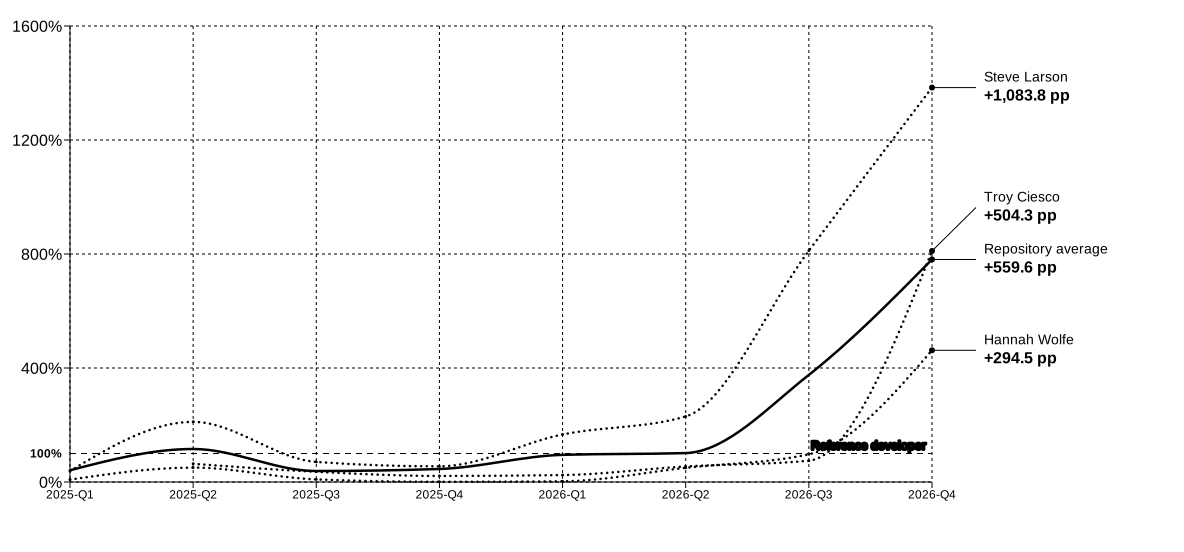
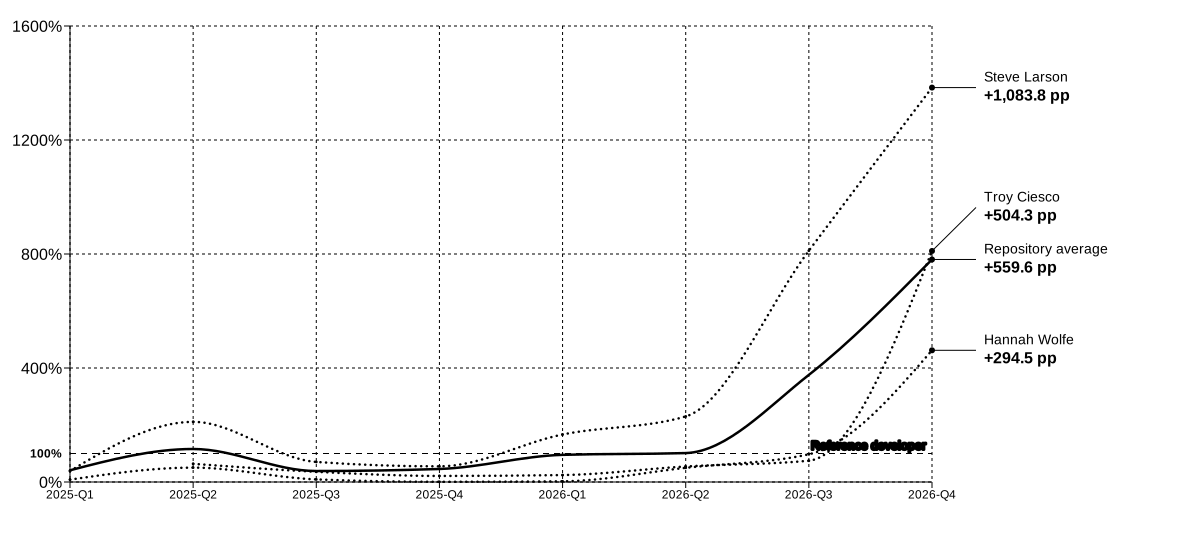
100% is the DevGhost benchmark. A full-time mid-level developer who knows the project and works without AI.
Latest point: October 1–7, 2026.
AI work in the public project history
Compare your team’s result against the same benchmark.
Three DevGhost formats
One job: understand software output. Choose where code is processed and where results are stored.
Connect repositories and share dashboards without a local installation.
2,000 signup credits
plus 500 every month
Free DevGhost account
Analyze local Git history in VS Code, Cursor, or the DevGhost app for Windows.
500 new commits free every month
No subscription or bank card
Run DevGhost on your own servers, with deployment support.
Terms matched to your infrastructure
Add credits with a one-time payment. Cloud and Local packs are purchased separately for the format you use.
| Pack | Local |
|---|---|
| 1,000 credits | $29 |
| 5,000 credits | $99 |
| 20,000 credits | $299 |
The cloud shows the exact cost before analysis starts. In Local, one credit covers one newly analyzed commit.
DevGhost On-Prem
We will discuss deployment in your company infrastructure and the right implementation path. Technical details can follow in the conversation.
Help with your first run
The DevGhost founder will show you the product, help choose a repository and period, and review the results with you. The first assisted pilot is free.